> ## Documentation Index
> Fetch the complete documentation index at: https://docs.pawapay.io/llms.txt
> Use this file to discover all available pages before exploring further.
# Statements
You always have access to a full financial statement for each of your wallets to be able to audit and reconcile your balance on our platform.
## Search statements
To see every single transaction on your wallet, please start by choosing:
* The time period
* A wallet
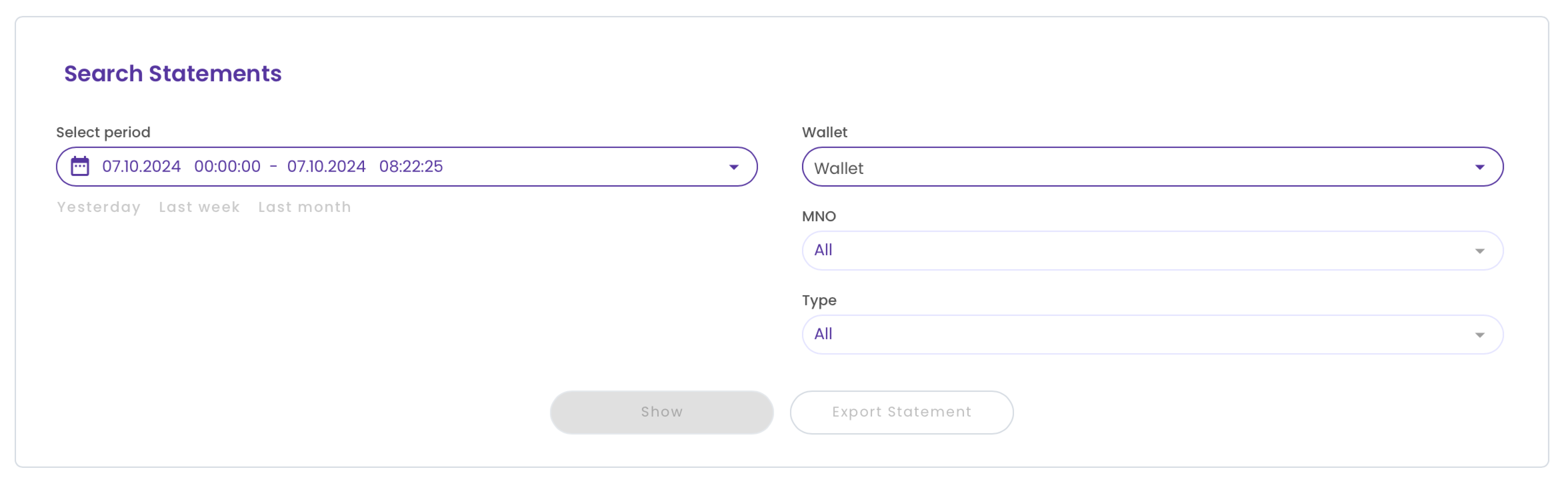 Pressing "Show" will display a table with the transactions on this wallet for the selected period. You can also limit the results to specific Mobile Money Operators (MMOs) or transaction types.
You can choose up to a **one-month period at a time**.
A maximum of 10,000 transactions are displayed.
Statement data for the current day may be up to 20 minutes behind the latest transactions.
By default, results are shown starting from the most recent transaction. You can change the order by pressing on the respective column in the header of the table.
## Export statements
After selecting the wallet and time period, press the "Export statement" button to generate a CSV file with the results.
You will be asked to confirm this action and then taken to the [History](/dashboard/finances/history) page to download the resulting CSV file.
You can choose up to a **one month period** at a time.
There is no limit to the number of transactions.
The export may take some time to generate. The [History](/dashboard/finances/history) page will refresh itself automatically to show the latest status.
## Data in statements
After exporting or viewing the statement data in our portal, the following data will be included:
| Column | Description |
| -------------- | ------------------------------------------------------------------------------------------------------------------------------------------------------------------------ |
| Creation Date | The date and time when this transaction was recorded on our platform. The time is in the UTC time zone. |
| MSISDN | The phone number of the mobile money wallet that was involved in the transaction. |
| Transaction ID | The ID of this transaction as specified by you through our API. You can read more about transaction IDs from [our API docs](/v1/api-reference/deposits/request-deposit). |
| Amount | The amount of the transaction. |
| Currency | The currency in which the transaction took place. |
| Country | The country in which this transaction took place. |
| MNO | The Mobile Money Operator (MMO) that fulfilled this transaction. |
| Type | The type of this transaction. See the list of all [transaction types](/dashboard/finances/statements#transaction-types) below. |
| Balance | Your balance after this transaction. |
| Reason | The reason for this transaction, for example, "Initial top-up" for your first top-up of this wallet. |
| Metadata | Metadata in JSON format you attached to the payments for providing additional context about the payment. |
Not all columns are populated for all transactions. For example, transactions that represent a settlement of your balance do not have an MSISDN and MMO specified.
## Transaction types
You may encounter the following transaction types in your statements:
| Transaction type | Description |
| ------------------------ | ----------------------------------------------------------------------------------------------------------------------------------------- |
| Deposit | Money collected from a customer has been deposited on your wallet. |
| Payout | Money has been paid out to a customer from your wallet. |
| Failed payout refund | Money initially reserved from your wallet for a payout has been returned due to the payout failing. |
| Refund | Money initially collected to your wallet has been refunded to the customer. |
| Failed refund reversal | Money initially reserved from your wallet for a refund has been returned due to the refund failing. |
| Deposit pass-through fee | A fee charged by the Mobile Money Operator (MMO) for a deposit. |
| Payout pass-through fee | A fee charged by the Mobile Money Operator (MMO) for a payout. |
| Refund pass-through fee | A fee charged by the Mobile Money Operator (MMO) for a refund. |
| PawaPay deposit fee | A fee charged by PawaPay for a deposit. |
| PawaPay payout fee | A fee charged by PawaPay for a payout. |
| PawaPay refund fee | A fee charged by PawaPay for a refund. |
| Top up | Funds sent by you have been added to your wallet. Read more about [Topping up your wallets](/dashboard/topping_up). |
| Withdrawal | Funds withdrawn from your wallet to be settled to your bank. Read more about [requesting a settlement](/dashboard/requesting_settlement). |
Additional infomation for all Adjustments and Compensations is provided in the Details column.
Pressing "Show" will display a table with the transactions on this wallet for the selected period. You can also limit the results to specific Mobile Money Operators (MMOs) or transaction types.
You can choose up to a **one-month period at a time**.
A maximum of 10,000 transactions are displayed.
Statement data for the current day may be up to 20 minutes behind the latest transactions.
By default, results are shown starting from the most recent transaction. You can change the order by pressing on the respective column in the header of the table.
## Export statements
After selecting the wallet and time period, press the "Export statement" button to generate a CSV file with the results.
You will be asked to confirm this action and then taken to the [History](/dashboard/finances/history) page to download the resulting CSV file.
You can choose up to a **one month period** at a time.
There is no limit to the number of transactions.
The export may take some time to generate. The [History](/dashboard/finances/history) page will refresh itself automatically to show the latest status.
## Data in statements
After exporting or viewing the statement data in our portal, the following data will be included:
| Column | Description |
| -------------- | ------------------------------------------------------------------------------------------------------------------------------------------------------------------------ |
| Creation Date | The date and time when this transaction was recorded on our platform. The time is in the UTC time zone. |
| MSISDN | The phone number of the mobile money wallet that was involved in the transaction. |
| Transaction ID | The ID of this transaction as specified by you through our API. You can read more about transaction IDs from [our API docs](/v1/api-reference/deposits/request-deposit). |
| Amount | The amount of the transaction. |
| Currency | The currency in which the transaction took place. |
| Country | The country in which this transaction took place. |
| MNO | The Mobile Money Operator (MMO) that fulfilled this transaction. |
| Type | The type of this transaction. See the list of all [transaction types](/dashboard/finances/statements#transaction-types) below. |
| Balance | Your balance after this transaction. |
| Reason | The reason for this transaction, for example, "Initial top-up" for your first top-up of this wallet. |
| Metadata | Metadata in JSON format you attached to the payments for providing additional context about the payment. |
Not all columns are populated for all transactions. For example, transactions that represent a settlement of your balance do not have an MSISDN and MMO specified.
## Transaction types
You may encounter the following transaction types in your statements:
| Transaction type | Description |
| ------------------------ | ----------------------------------------------------------------------------------------------------------------------------------------- |
| Deposit | Money collected from a customer has been deposited on your wallet. |
| Payout | Money has been paid out to a customer from your wallet. |
| Failed payout refund | Money initially reserved from your wallet for a payout has been returned due to the payout failing. |
| Refund | Money initially collected to your wallet has been refunded to the customer. |
| Failed refund reversal | Money initially reserved from your wallet for a refund has been returned due to the refund failing. |
| Deposit pass-through fee | A fee charged by the Mobile Money Operator (MMO) for a deposit. |
| Payout pass-through fee | A fee charged by the Mobile Money Operator (MMO) for a payout. |
| Refund pass-through fee | A fee charged by the Mobile Money Operator (MMO) for a refund. |
| PawaPay deposit fee | A fee charged by PawaPay for a deposit. |
| PawaPay payout fee | A fee charged by PawaPay for a payout. |
| PawaPay refund fee | A fee charged by PawaPay for a refund. |
| Top up | Funds sent by you have been added to your wallet. Read more about [Topping up your wallets](/dashboard/topping_up). |
| Withdrawal | Funds withdrawn from your wallet to be settled to your bank. Read more about [requesting a settlement](/dashboard/requesting_settlement). |
Additional infomation for all Adjustments and Compensations is provided in the Details column.